Slow Wi-Fi can be incredibly frustrating—especially when you need your internet to work smoothly for video calls, online classes, gaming, or streaming. When pages take forever to load or your video keeps freezing, you might immediately wonder, “Why is my Wi-Fi slow?”
In many homes—especially apartments—the real cause isn’t your ISP or modem. Instead, it’s Wi-Fi channel interference, which happens when too many routers around you use the same Wi-Fi channel. Fortunately, this problem is easy to diagnose and can be fixed in just a few minutes, even if you’re not tech-savvy.
What Causes Slow Wi-Fi (And Why It’s Not Your ISP Most of the Time)
Many users are surprised to learn that Wi-Fi issues often have nothing to do with the internet plan they’re paying for. Instead, the slowdown happens between your device and the router.
A study by the Wi-Fi Alliance reported that over 60% of home Wi-Fi issues are caused by interference, not bandwidth limitations. This means two neighbors using the same Wi-Fi channel can affect each other without realizing it.
Because of this, even a fast 300 Mbps plan can feel like 10 Mbps.
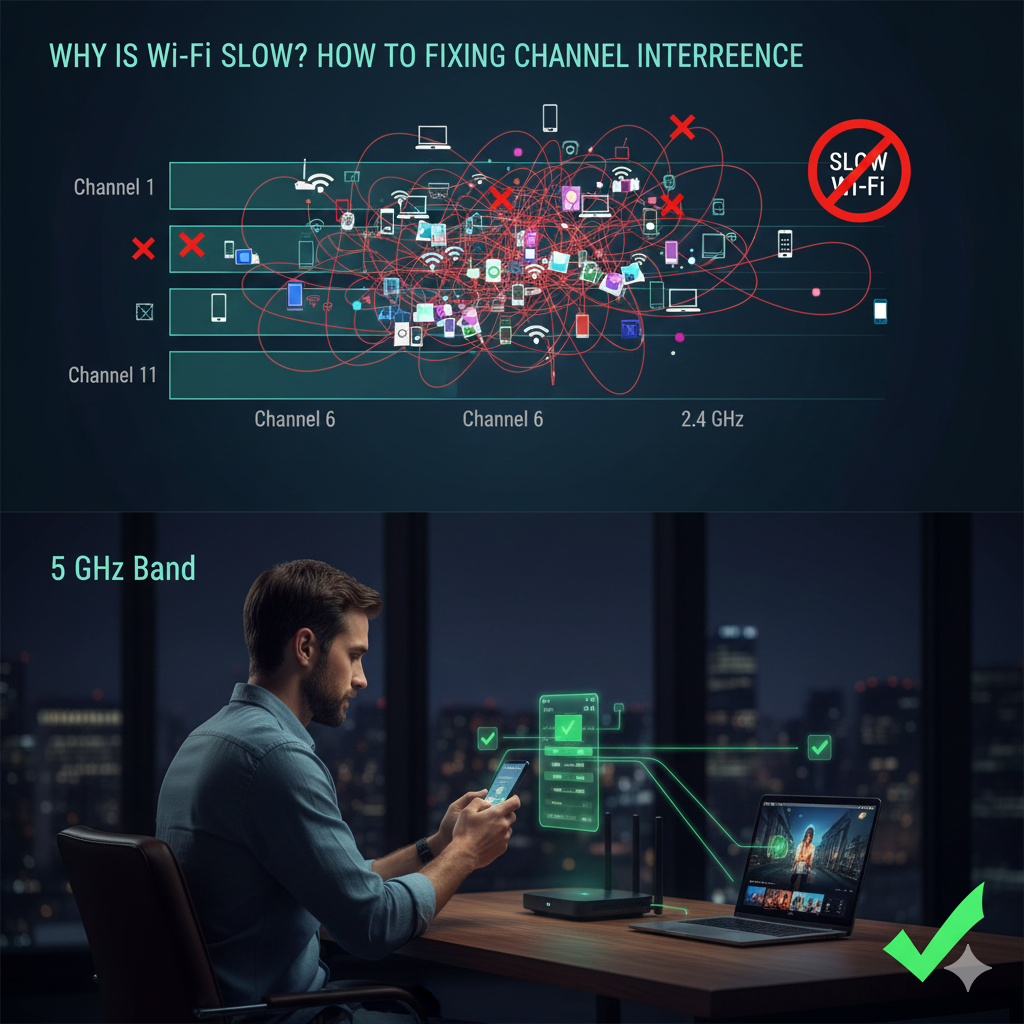
Understanding Wi-Fi Channel Interference
What Wi-Fi Channels Actually Do
Think of Wi-Fi channels like lanes on a highway. Your router must pick a lane (channel) to broadcast its signal. But if too many nearby routers choose the same lane, traffic builds up. Your device must “wait” before sending or receiving data, causing lag and slow speeds.
The 2.4 GHz Band
Only channels 1, 6, and 11 do not overlap. If your neighbors also use one of these, interference increases.
The 5 GHz Band
Has more channels, but apartment buildings can still cause congestion when many routers choose the same channel.
How to Diagnose Wi-Fi Channel Interference (Beginner Method)
Step 1: Install a Free Wi-Fi Analyzer
Use any simple analyzer app such as:
• AirPort Utility (iPhone)
• WiFi Analyzer (Android)
Step 2: Scan the Nearby Channels
Look for a cluster of networks overlapping your channel. If several routers use “Channel 6,” that’s a sign of congestion.
Step 3: Check Both Bands
Even 5 GHz can slow down if many households use similar channels.
How to Fix Slow Wi-Fi Caused by Channel Interference
Step 1: Log In to Your Router
Open a browser and enter:
192.168.1.1
192.168.0.1
(or your router’s address)
Step 2: Go to Wi-Fi Settings
Look for: Wireless / Wi-Fi / Advanced Wireless Settings.
Step 3: Change the Channel
Use this rule:
For 2.4 GHz
Choose Channel 1, 6, or 11. Pick the least crowded one.
For 5 GHz
Choose a clean channel recommended by your analyzer app.
Step 4: Save and Restart
Your devices reconnect automatically.
Routers With Auto Channel Optimization (Hands-Free Solution)
If you don’t want to manually check channels or live in a high-interference area, upgrading to a router with automatic channel optimization can instantly stabilize your Wi-Fi. These routers scan for congestion continuously and adjust channels on their own.
Below are three beginner-friendly models:
TP-Link Archer AX55
Best for: Apartments and small homes
Why it helps:
Includes AI-driven channel scanning and automatic performance tuning. Great plug-and-play option.
Good for users who:
Want stable Wi-Fi without touching any settings.
ASUS RT-AX58U
Best for: Households with many devices
Why it helps:
Optimizes channels and uses Adaptive QoS to improve streaming and video calls.
Good for users who:
Work from home or have heavy usage.
Google Nest WiFi (Mesh System)
Best for: Multi-room homes with dead zones
Why it helps:
Optimizes band selection, channel selection, and mesh routing paths automatically.
Good for users who:
Struggle with weak signals in certain rooms.
How to Choose the Right Router for Your Situation
Small Apartment
TP-Link AX55 — stable and affordable.
Multi-device household
ASUS RT-AX58U — better load handling.
Big home or double-storey house
Google Nest WiFi — removes dead zones.
Key Takeaway
If you’re constantly wondering “why is my Wi-Fi slow,” there’s a high chance it’s caused by Wi-Fi channel interference. By changing your channel or switching to a router that automatically optimizes channels, you can dramatically improve speed and stability without upgrading your internet plan.
Frequently Asked Questions (FAQ)
Why does my Wi-Fi slow down at night?
More neighbors turn on their routers, increasing interference.
Why is only my phone slow but not my laptop?
Different devices handle interference differently depending on antenna quality.
How often should I change my Wi-Fi channel?
Once a month or whenever you notice sudden slowdowns.
Will buying a new router fix slow Wi-Fi?
Yes, especially if the new router has automatic channel optimization and Wi-Fi 6 support.
Is 2.4 GHz or 5 GHz better?
2.4 GHz = Range
5 GHz = Speed