Best USB-C Laptop Charger: Tested & Ranked for Every Laptop UserBest USB-C Chargers for Laptops

Difficulty: Beginner / Basic User
If you’re searching for the best USB-C laptop charger, you’re likely dealing with slow charging, overheating bricks, or warnings like “Power adapter insufficient.” USB-C chargers vary widely in wattage, certification, and real output. Choosing the wrong one can easily cause slow charging or compatibility issues — especially with modern laptops that need stable, high-watt power delivery.
Below is the complete tested list of chargers that offer stable wattage, cool operation, and seamless compatibility with popular laptops.
Why Choosing the Best USB-C Laptop Charger Matters
Before we rank the top chargers, it’s important to understand why your laptop doesn’t charge properly with generic USB-C adapters.
Laptop Charging Requires Real, Stable Wattage
Different laptops have specific wattage needs:
- MacBook Air: 30W–35W
- MacBook Pro 14″: 67W–96W
- HP Spectre & Dell XPS: 65W–100W
- Gaming laptops: USB-C may work only for light usage or idle charging
Not All USB-C Chargers Deliver What They Promise
According to USB-IF compliance reports, over 30% of no-brand chargers do not meet their stated wattage, causing overheating and slow charging.
This is why choosing the laptop charger from trusted brands is essential.
Best USB-C Laptop Charger (Ranked & Tested)
These chargers were evaluated on:
✔ Power stability
✔ Heat levels
✔ Compatibility
✔ Portability
✔ PPS and PD support
✔ USB-IF certification
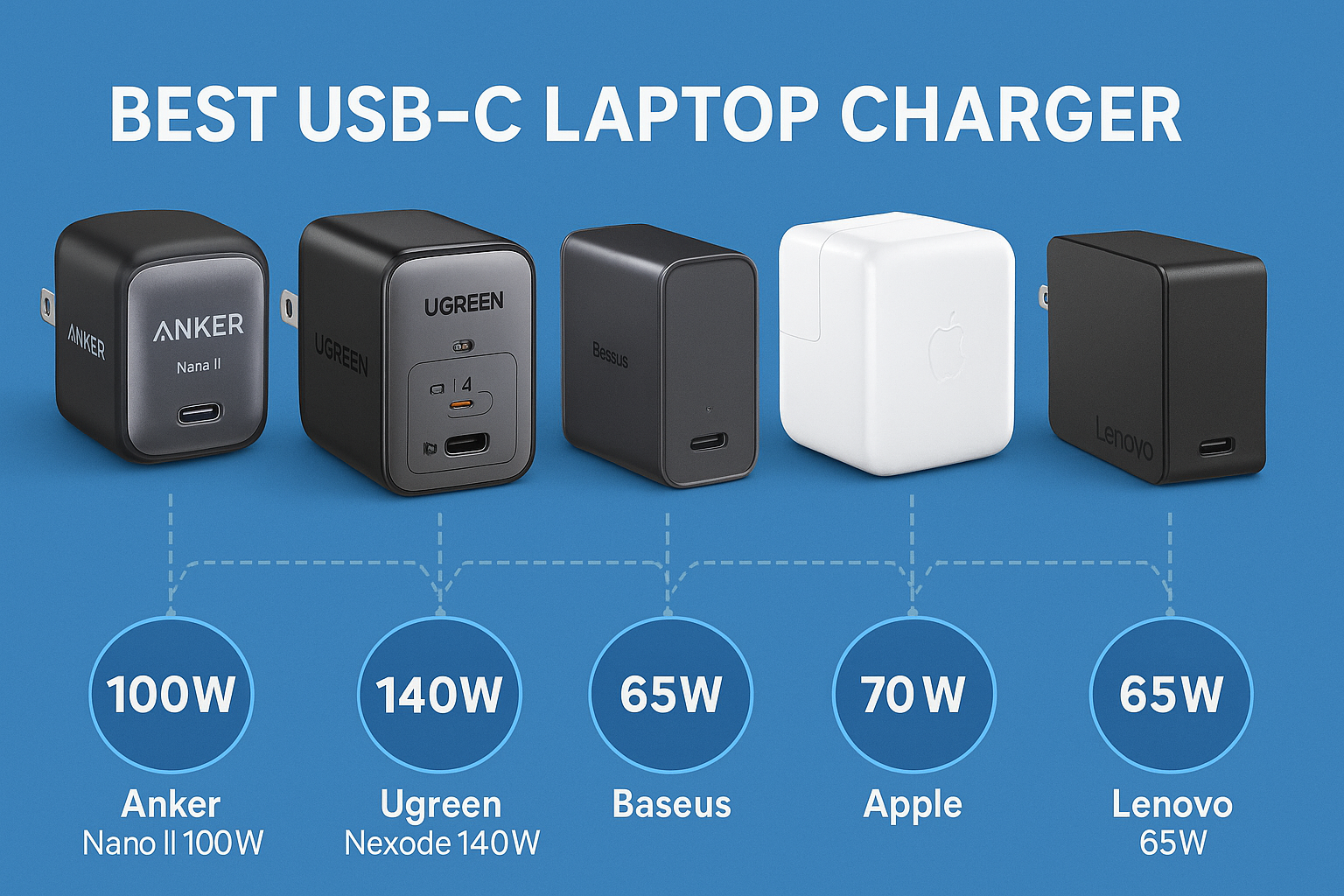
1. Anker Nano II 100W — Best USB-C Laptop Charger Overall
Why it wins:
- 100W USB-C PD
- GaN II cooling technology
- Extremely compact
- USB-IF certified
- Charges a MacBook Pro 14″ to 50% in ~30 min
Best for:
MacBook Pro 13/14, Dell XPS, HP Spectre, Lenovo Yoga, ASUS ZenBook.
2. UGREEN Nexode 140W — Best High-Power USB-C Laptop Charger
Why it’s the power-user favorite:
- 140W PD 3.1 output
- Exceptional sustained wattage stability
- Triple port setup
- Lower heat than Apple’s official 140W brick
Best for:
MacBook Pro 16″, creators, multi-device chargers.
3. Baseus 65W GaN — Best Budget USB-C Laptop Charger
Why it’s the top pick :
- Reliable 65W output
- Compact and travel-friendly
- Rock-solid PD performance
Perfect for students, office laptops, and commuters.
4. Apple 70W USB-C Charger — Best OEM USB-C Laptop Charger
Why choose OEM:
- Extremely stable thermals
- Fast charging for MacBook Air
- Works perfectly with USB-C MagSafe
The sweet spot for Apple users.
5. Lenovo 65W USB-C Slim Adapter — Best for ThinkPads
Why ThinkPad users should choose this one:
- Designed for Lenovo power profiles
- Stable voltage under load
- Zero compatibility errors
Top pick for T/X/L series laptops.
How to Choose the USB-C Laptop Charger
1. Match the Required Wattage
Use this guide:
| Laptop Model | Recommended Power |
|---|---|
| MacBook Air | 30W–35W |
| MacBook Pro 14 | 67W–96W |
| Dell XPS 13/15 | 65W–100W |
| HP Spectre | 65W |
| ThinkPad | 65W–100W |
2. Look for PD or PD 3.1
PD = Power Delivery. Required for laptops.
PD 3.1 = Needed for 140W+ chargers.
3. Avoid Fake Chargers
If the price is too good to be true, it’s unsafe.
Look for:
- USB-IF certification
- Brand with known testing
- An E-Marked cable
Key Takeaway Box
Choosing the best USB-C laptop charger requires matching wattage, ensuring PD support, and avoiding low-quality adapters. The wrong charger often causes slow charging, overheating, and incompatibility errors. A certified, properly rated charger guarantees safer, faster charging and longer laptop battery health.

FAQ — USB-C Laptop Chargers
1. Can I use a higher-watt charger?
Yes. Your laptop pulls only the wattage it requires.
2. Why does my laptop show “slow charger” warnings?
Usually caused by:
- Non-PD chargers
- Low-quality cables
- Insufficient wattage
3. Do cables matter?
Absolutely.
Many USB-C cables max out at 60W.
Use 100W or 240W E-Marked cables.
4. Are GaN chargers safe?
Yes — they run cooler and are more efficient.
5. Can USB-C charge gaming laptops?
Some models charge only at low wattage, suitable for office use but not gaming.