
ISP Throttling Explained: Why Your Internet Slows Down and What You Can Do

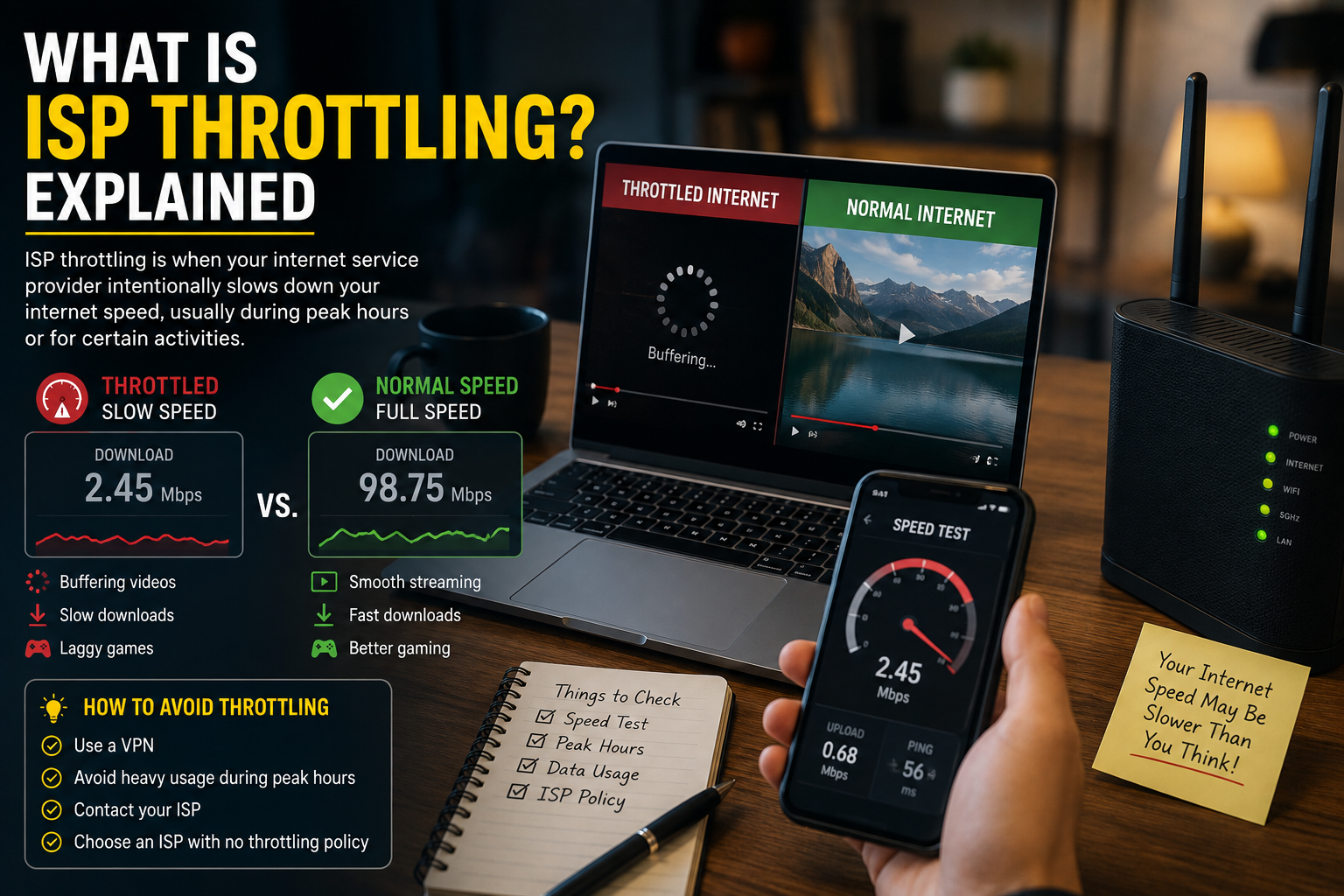
If your internet suddenly feels slow even though your Wi-Fi signal looks strong, you may wonder if ISP throttling is the reason.
Maybe Netflix starts buffering at night. Maybe downloads are fast in the morning but painfully slow after dinner. Maybe your mobile data becomes almost unusable after you hit a certain monthly usage amount.
That is where throttling comes in.
In simple terms, throttling means your internet provider is “turning down the speed knob.” Your connection still works, but it does not run as fast as expected.
The tricky part is that not every slow connection is throttling. Sometimes the issue is your router, weak Wi-Fi, old cables, too many connected devices, a crowded network, or even the website you are trying to access.
So let’s break it down clearly.
Definition Box
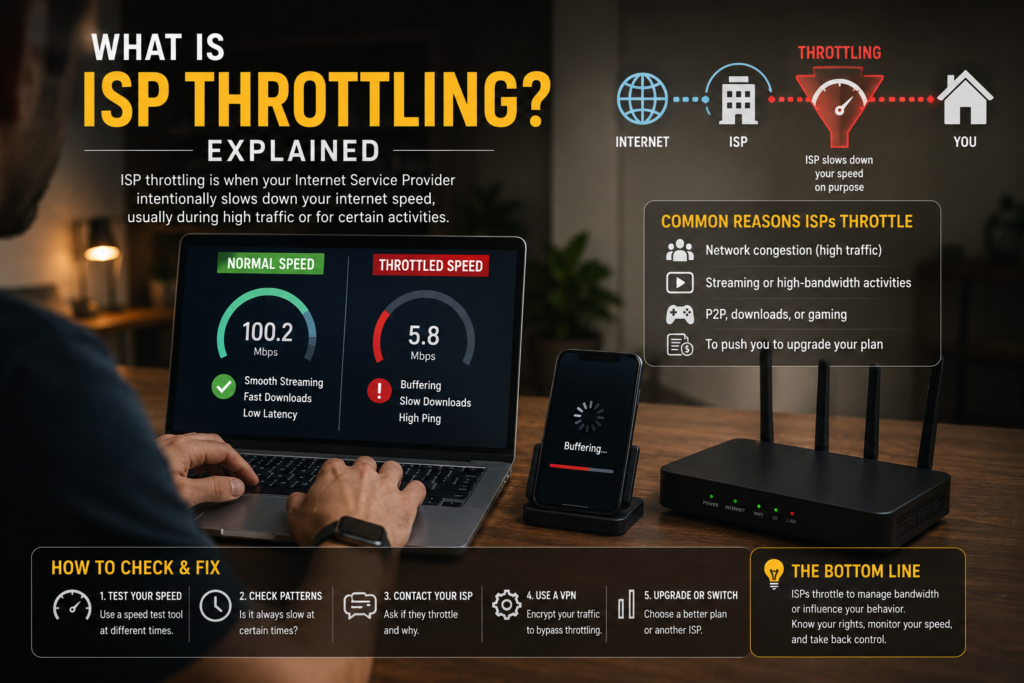
ISP throttling means your Internet Service Provider intentionally reduces your internet speed or limits certain types of online activity. It is different from normal slow Wi-Fi because throttling is usually controlled by the provider, not your home equipment.
What Is ISP Throttling?
An ISP is an Internet Service Provider. This is the company that gives you internet access, such as your fibre provider, mobile data provider, cable internet provider, or broadband company.
Throttling means slowing something down on purpose.
So, when people ask “what is ISP throttling?”, they are really asking:
Is my internet provider deliberately making my connection slower?
The answer can be yes, but not always.
Think of your internet connection like a highway. When traffic is light, cars move fast. When traffic is heavy, everything slows down. But throttling is more like the highway operator opening fewer lanes for certain drivers or certain vehicles.
For example:
| Situation | What It Means |
|---|---|
| Your speed slows after using 100GB of data | Possible data-cap throttling |
| Video streaming is slow but browsing is fine | Possible service-based throttling |
| Speed drops every evening | Could be congestion or peak-hour management |
| Mobile data slows after “unlimited” limit | Common fair usage policy |
| One website is slow but others are fine | May not be throttling |
The important thing is this: throttling is controlled by the internet provider. Normal home Wi-Fi problems are controlled by your equipment, location, or setup.
How ISP Throttling Works
ISP throttling usually happens at the provider’s network level. That means the slowing happens before the internet reaches your home router, phone, or laptop.
Your ISP can manage traffic in several ways:
Slowing your whole connection
This is when everything becomes slower: browsing, streaming, downloads, gaming, video calls, and file uploads.
This may happen after you exceed a monthly data limit or during very heavy network congestion.
Slowing specific activities
Sometimes only certain types of traffic feel slow.
For example:
- Video streaming becomes low quality.
- Large downloads take longer.
- Gaming gets higher latency.
- Peer-to-peer downloads become unstable.
- Hotspot usage is slower than normal phone data.
This type is harder for normal users to detect because your speed test may still look fine while certain apps perform badly.
Prioritising some users over others
On mobile networks, your plan may get lower priority after you use a certain amount of data. This is often called deprioritisation.
Think of it like a queue at a service counter. You are still in line, but some customers are served before you when the place gets crowded.
This is common in “unlimited” mobile plans. The plan may still be unlimited in data amount, but not unlimited in high-speed performance.
Applying fair usage policies
Many providers use something called a Fair Usage Policy, often shortened to FUP.
This means the provider allows heavy usage up to a certain point. After that, your speed may be reduced to keep the network usable for other customers.
This is common for mobile broadband, home wireless broadband, and some cheaper unlimited plans.
Why Do Internet Providers Throttle Speeds?
There are several reasons providers may slow down connections.
Network congestion
The most common reason is congestion.
Congestion happens when too many people use the network at the same time. It is like everyone in your neighbourhood turning on video streaming, gaming, downloads, and video calls at once.
Peak times are usually:
- Evening after work
- Weekend nights
- Public holidays
- Major sports or live event periods
- School holiday periods
During these times, the provider may manage traffic to keep the network stable.
Data caps and fair usage limits
Some plans include a data cap. This means you get a certain amount of high-speed data per month.
After that, one of three things may happen:
- Your speed becomes slower.
- You are charged extra.
- Your service continues but with restrictions.
The U.S. Federal Communications Commission has required broadband providers to disclose accurate information about network management practices, performance characteristics, and commercial terms so consumers can make informed choices.
Plan type restrictions
Not all internet plans are equal.
A cheaper plan may have:
- Lower priority
- Lower maximum speed
- Lower upload speed
- Hotspot limitations
- Streaming quality limits
- Speed reduction after heavy use
This is why two people using the same provider may get different experiences.
Video streaming management
Some mobile or broadband plans limit video quality to save bandwidth.
For example, a plan may allow normal browsing at full speed but limit video streaming to standard definition. To a normal user, this feels like “YouTube is slow,” but technically the provider may be limiting video traffic.
Heavy downloader management
Providers may also manage customers who use extremely high amounts of data. This can affect people who download large files, run cloud backups, use CCTV cloud storage, host servers, or stream in 4K all day.
Not all heavy usage is bad. But from the provider’s view, a small number of very heavy users can consume a large amount of shared network capacity.
Is ISP Throttling Legal?
This depends on your country, the type of service, and the provider’s terms.
In general, providers may be allowed to manage their networks, especially for congestion, security, and fair usage reasons. However, they are usually expected to disclose important restrictions clearly.
In the United States, federal rules have included a “no throttling” principle that says broadband providers must not impair or degrade lawful internet traffic based on content, application, service, or non-harmful device, subject to reasonable network management.
That last phrase is important: reasonable network management.
It means a provider may still manage traffic for technical reasons, such as preventing congestion, protecting the network, or maintaining service quality.
The problem starts when providers advertise something as unlimited or high-speed but hide major restrictions in tiny fine print. The U.S. Federal Trade Commission previously settled with AT&T over allegations that customers on “unlimited” plans had their speeds reduced after using certain amounts of data, and the FTC said restrictions on promised speed or data must be clearly disclosed.
For normal users, the practical lesson is simple: always check your plan’s fair usage policy, data cap, speed limit, and network management terms.
ISP Throttling vs Normal Slow Internet
This is where many people get confused.
Slow internet does not always mean throttling.
Here is a simple comparison:
| Problem | Likely Cause | Example |
|---|---|---|
| Wi-Fi weak in bedroom | Router signal issue | Full speed near router, slow upstairs |
| Slow every evening | Congestion or throttling | Speed drops around 8 PM daily |
| Slow after monthly data use | Data-cap throttling | Speed drops after 100GB |
| Only one app is slow | App/server issue or selective throttling | Netflix buffers but websites load fast |
| Speed test is fast, video is slow | Possible video traffic shaping | Speed test shows 300 Mbps, YouTube buffers |
| Uploads are slow all the time | Plan limitation | Download fast, upload weak |
Before blaming your provider, test your own setup first.
A bad router, old modem, damaged cable, poor Wi-Fi placement, overloaded device, or background cloud backup can make your internet feel throttled even when the provider is not doing anything unusual.
Common Signs of ISP Throttling
You may suspect ISP throttling if you notice patterns like these:
Your speed drops after a certain data amount
This is one of the clearest signs.
For example, your internet is fast for the first part of the month, then suddenly becomes slower after you use a certain amount of data.
This is common with mobile data plans, wireless broadband, and “unlimited” plans with fair usage limits.
Your internet slows at the same time every day
If your connection slows every night from around 8 PM to 11 PM, it may be peak-hour congestion.
This may not always be deliberate throttling. It may simply mean too many users are sharing the same local network capacity.
Specific apps are slower than others
If video streaming is slow but normal browsing is fine, your provider may be managing video traffic.
But be careful: streaming issues can also be caused by the streaming platform, your device, your TV app, your router, or Wi-Fi interference.
Speed test results do not match real usage
Sometimes your speed test looks good, but downloads, streaming, or gaming still feel poor.
This can happen because speed test servers may be treated differently from normal websites and apps, or because the problem is not raw speed but latency, routing, or packet loss.
Your mobile hotspot is slower than phone browsing
Some mobile plans treat hotspot usage differently from phone usage.
You may get high-speed data on your phone but slower speed when sharing that connection to a laptop or TV.
How to Check for ISP Throttling
You cannot always prove throttling perfectly from home, but you can collect useful clues.
Step 1: Test using a wired connection
If you are using home fibre or broadband, connect your laptop directly to the router using an Ethernet cable.
This removes Wi-Fi from the test.
If wired speed is good but Wi-Fi is bad, your problem is probably Wi-Fi—not throttling.
Step 2: Run speed tests at different times
Test your speed:
- Morning
- Afternoon
- Evening
- Late night
- Before and after heavy usage
- At the start and end of your billing cycle
Write down the results.
If speed drops only during peak hours, congestion may be the issue. If speed drops after hitting a usage amount, your plan may have a fair usage limit.
Step 3: Compare different apps and websites
Try testing:
- YouTube
- Netflix
- Normal browsing
- Large file downloads
- Cloud storage upload
- Online gaming
- Video calls
If only one category is slow, it may be app-specific, server-specific, or traffic-specific.
Step 4: Check your provider’s app or account portal
Look for:
- Monthly data usage
- Fair usage limit
- High-speed quota
- Hotspot quota
- Plan speed
- Add-on restrictions
- Network management terms
Sometimes the answer is already inside the plan details.
Step 5: Restart your router and test again
This sounds basic, but it matters.
Routers can become unstable after running for weeks. Restarting can clear temporary issues and give you a cleaner test result.
Step 6: Test with another device
If your laptop is slow but your phone is fast on the same network, the issue may be your laptop.
If every device is slow at the same time, the issue is more likely your router, modem, Wi-Fi environment, or provider connection.
Step 7: Contact your ISP with evidence
Do not just say, “My internet is slow.”
Give details:
- Your plan name
- Speed test results
- Date and time
- Wired or Wi-Fi test
- Device used
- Apps affected
- Whether you exceeded data usage
- Screenshots from the provider app
This makes it harder for support to give generic answers.
Quick Fix Box
Before assuming throttling, test with Ethernet, restart your router, check your monthly data usage, and run speed tests at different times of the day. If the slowdown follows a clear pattern, you have stronger evidence.
Can a VPN Stop ISP Throttling?
Sometimes, but not always.
A VPN encrypts your traffic and hides the specific websites or apps you are using from your provider. This may help if your provider is slowing down certain types of traffic, such as video streaming.
However, a VPN will not help if:
- Your whole connection is capped
- You already exceeded your monthly data limit
- Your plan has a fixed speed limit
- Your network is congested
- Your Wi-Fi signal is weak
- Your router is the bottleneck
- Your provider slows all encrypted traffic equally
A VPN can also make your connection slower because your traffic has to travel through an extra server.
So, do not treat a VPN as a magic fix. It is a useful test tool and privacy tool, but it does not remove plan limits.
What to Do If ISP Throttling Happens
If you believe your provider is slowing your connection, here are practical steps.
Check your plan details
Look for words like:
- Fair usage policy
- High-speed quota
- Data cap
- Speed management
- Traffic management
- Hotspot limit
- Video optimisation
- Acceptable use policy
- Network management
These terms often explain when and why speeds may drop.
Upgrade only if the limit is real
If your slowdown happens because you exceeded your high-speed data allowance, upgrading may help.
But do not upgrade blindly.
First confirm the actual cause. If the problem is bad Wi-Fi placement or old equipment, a more expensive plan may still feel slow.
Ask the provider directly
Ask clear questions:
- Does my plan have a fair usage policy?
- What happens after I exceed the monthly data amount?
- Is video streaming limited?
- Is hotspot usage treated differently?
- Is my area congested during peak hours?
- Can you check line quality or signal strength?
- Is my router compatible with my plan speed?
The goal is to get a specific answer, not a generic “please restart your router.”
Compare with another provider
If your area has multiple internet providers, compare:
- Real user reviews in your area
- Contract terms
- Speed after data limit
- Upload speed
- Installation fee
- Router quality
- Customer support reputation
- Actual coverage, not just advertised coverage
For mobile broadband, coverage can vary street by street. One provider may be excellent in one neighbourhood and weak in another.
File a complaint if terms were misleading
If the provider promised a certain service but failed to clearly disclose major restrictions, you may consider filing a complaint with the relevant consumer or communications authority in your country.
Keep screenshots, bills, plan pages, speed tests, chat logs, and complaint reference numbers.
How to Avoid Throttling Before It Happens
The best solution is to choose the right plan from the beginning.
Read the fair usage policy
This is boring but important.
A plan advertised as “unlimited” may still reduce speed after a certain data amount.
Unlimited does not always mean unlimited full-speed internet.
Choose fibre if available
For homes and offices, fibre broadband is usually more stable than mobile broadband or wireless broadband.
Mobile internet is convenient, but it is more affected by tower congestion, signal strength, distance, weather, indoor walls, and user density.
Use the right router
A weak router can make a good internet plan feel terrible.
If you subscribe to a high-speed plan but use an old router, your Wi-Fi may not deliver the full speed.
Avoid peak-hour heavy downloads
If your area is congested at night, schedule large downloads, game updates, and cloud backups during off-peak hours.
This does not remove throttling, but it can improve your real experience.
Monitor your usage
Check which devices use the most data.
Common heavy users include:
- Smart TVs
- Game consoles
- CCTV cameras
- Cloud backup apps
- Windows updates
- Large file sync tools
- 4K streaming apps
- Kids’ tablets and phones
Sometimes the “mystery data usage” is simply one device silently downloading or uploading in the background.
FAQ
What does ISP throttling mean?
ISP throttling means your internet provider intentionally slows your connection, certain apps, or specific types of internet activity. It may happen because of data limits, congestion, plan restrictions, or network management.
How do I know if my ISP is throttling me?
Look for patterns. If your speed drops after a certain data amount, slows at the same time daily, or affects only specific apps, throttling may be possible. Test with Ethernet, compare different times, and check your plan’s fair usage policy.
Is ISP throttling the same as slow Wi-Fi?
No. Slow Wi-Fi is usually caused by your router, distance, walls, interference, or too many connected devices. Throttling happens when the provider intentionally reduces speed at the network level.
Can a VPN bypass ISP throttling?
A VPN may help if your provider slows specific types of traffic, such as streaming. It will not help if your entire plan is capped, your data limit has been reached, your area is congested, or your Wi-Fi is the real problem.
Why is my internet slow at night?
Night-time slowdowns are often caused by network congestion because more people are online at the same time. It may feel like throttling, but it can also be a shared capacity issue in your area.
Can unlimited internet still be throttled?
Yes. Some unlimited plans are unlimited in total data but not unlimited in full-speed data. After you reach a fair usage threshold, your speed may be reduced for the rest of the billing cycle or during congestion.
Final Thoughts
ISP throttling can be frustrating because your internet may still technically work, but not at the speed you expected.
The key is to avoid guessing.
First, check your own setup. Test with a cable, restart your router, compare devices, check Wi-Fi signal, and review your monthly usage. Then look at your provider’s plan terms and fair usage policy.
If the slowdown follows a clear pattern—such as after a certain data amount, during peak hours, or only with certain services—you may have a stronger case.
A VPN may help in some situations, but it is not a guaranteed fix. The best long-term solution is choosing a transparent provider, understanding your plan limits, using the right equipment, and keeping evidence when performance does not match what was promised.



[…] people blame the internet provider when the real problem is […]