


When you open a website, you probably type something simple like youtube.com, techwizs.com, or google.com.
But behind the scenes, your computer does not really understand website names the same way humans do. Computers use numbers called IP addresses to find servers on the internet.
That is where DNS comes in.
DNS, short for Domain Name System, works like the internet’s contact list. Instead of forcing you to remember a long number for every website, DNS lets you use normal website names.
According to ICANN, DNS makes the internet easier to use by allowing people to use text-based domain names instead of numerical IP addresses.
Definition Box
DNS stands for Domain Name System. It helps translate website names into IP addresses so your phone, laptop, or browser can find the correct website online.
What Is DNS in Simple Terms?
So, what is DNS in the easiest way to understand?
Think of DNS like your phone’s contact list.
You do not remember everyone’s phone number. You just tap a name like “Ali,” “Office,” or “Mum,” and your phone finds the correct number for you.
DNS does something similar for websites.
You type:
www.example.com
DNS helps your device find the correct IP address behind that website.
An IP address looks something like:
192.0.2.1
Without DNS, browsing the web would feel painful. You would need to remember numbers instead of names. Imagine trying to remember the IP address for Google, Facebook, YouTube, your bank, your work email, and every website you visit.
No thanks. That is not internet browsing. That is punishment with extra steps.
Why DNS Is Important
DNS is important because it makes the internet human-friendly.
You can remember netflix.com. You probably cannot remember a long server address behind Netflix.
DNS helps with:
- Opening websites
- Sending emails to the correct mail server
- Connecting apps to online services
- Helping online games reach their servers
- Allowing companies to manage websites and subdomains
- Supporting security features like DNSSEC
Google describes DNS as an important part of web infrastructure and says your computer performs a DNS lookup every time you visit a website.
That means DNS is not something rare or advanced. It happens all the time, quietly in the background.
Every time you visit a website, your device is basically asking, “Where is this website located?”
DNS answers that question.
How DNS Works Step by Step
Let’s break it down without making it too technical.
When you type a website name into your browser, several things happen very quickly.
Step 1: You enter a website name
You type something like:
techwizs.com
Your browser needs to know where that website lives on the internet.
Step 2: Your device checks if it already knows the answer
Your computer or phone may have visited the website before.
If it remembers the IP address, it can use the saved answer. This saved answer is called a DNS cache.
Think of cache like short-term memory.
Step 3: Your device asks a DNS resolver
If your device does not know the answer, it asks a DNS resolver.
A DNS resolver is usually provided by:
- Your internet service provider
- Your mobile network
- A public DNS provider
- Your company network
- Your router
Popular public DNS providers include Google Public DNS, Cloudflare DNS, and Quad9.
Step 4: The DNS resolver looks for the answer
If the resolver does not already know the answer, it searches through the DNS system.
It may check different DNS servers to find the correct record.
Step 5: Your device gets the IP address
Once the correct IP address is found, your browser can connect to the website.
Step 6: The website loads
Now your browser knows where to go, and the website appears on your screen.
All of this usually happens in milliseconds. You do not notice it unless something goes wrong.
What Is DNS Used For?
Understanding what is DNS becomes easier when you see what it actually does.
DNS is used for more than just opening websites.
Website browsing
This is the most common use.
When you visit a website, DNS helps your browser find the server hosting that website.
Email delivery
Email also uses DNS.
When someone sends an email to name@company.com, DNS helps identify which mail server handles email for that domain.
This is why wrong DNS settings can break company email.
App connections
Many apps connect to servers in the background.
For example:
- Banking apps
- Food delivery apps
- Messaging apps
- Cloud storage apps
- Games
- Streaming apps
They may use domain names instead of fixed IP addresses, so DNS helps them connect properly.
Business systems
Companies use DNS for many services, such as:
- Websites
- Microsoft 365 email
- Google Workspace
- VPN access
- Internal portals
- Remote desktop services
- Customer support platforms
For businesses, DNS is not just a technical background thing. Bad DNS settings can cause real downtime.
Common DNS Records Explained Simply
DNS records are like instructions stored inside the DNS system.
Each record tells the internet something about a domain.
Here are the common ones.
A Record
An A record points a domain name to an IPv4 address.
Example:
example.com → 192.0.2.1
Simple meaning: “This website name lives at this internet address.”
AAAA Record
An AAAA record points a domain name to an IPv6 address.
IPv6 is the newer type of IP addressing used because the internet has grown so much.
Simple meaning: “This website also has a newer-style internet address.”
CNAME Record
A CNAME record points one name to another name.
For example:
shop.example.com → store.platform.com
Simple meaning: “This name is just an alias. Go check that other name.”
MX Record
An MX record tells the internet where to send email for a domain.
Simple meaning: “Send email for this domain to this mail server.”
If you use Microsoft 365 or Google Workspace email, MX records are very important.
TXT Record
A TXT record stores text information.
It is often used for email security and verification.
Examples include:
- SPF
- DKIM
- DMARC
- Domain ownership verification
Simple meaning: “Here is extra information other systems need to trust or verify this domain.”
NS Record
An NS record tells the internet which name servers are responsible for a domain.
Simple meaning: “Ask these servers for the official DNS answers.”

What Is DNS Cache?
A DNS cache is a saved copy of DNS answers.
When your device finds the IP address for a website, it may keep that answer temporarily.
This helps websites load faster because your device does not need to ask DNS again every single time.
Think of it like remembering the way to a restaurant you visited yesterday. You do not need Google Maps every time if the route is still fresh in your head.
But DNS cache can sometimes cause problems.
If a website changes server, your device might still remember the old address for a while. This can make a website fail to load even though it works for other people.
That is why IT support sometimes asks users to “flush DNS.”
What does flush DNS mean?
Flushing DNS means clearing the saved DNS memory from your device.
After that, your computer asks for fresh DNS information again.
This can help fix issues like:
- Website not loading
- Website showing old version
- Domain pointing to wrong server
- Email routing issues after DNS changes
- “Server not found” errors
What Is DNS Propagation?
DNS propagation means waiting for DNS changes to update across the internet.
For example, if you move your website to a new hosting provider, you may update your DNS records.
But not everyone around the world sees the new information immediately.
Some networks may still remember the old DNS answer until their cache expires.
This is why one person may say, “The website works for me,” while another person says, “It still shows the old page.”
Very annoying, yes. But normal.
DNS propagation can take minutes or hours, depending on the DNS settings and how different networks cache the information.
What Is DNS Server?
A DNS server is a server that helps answer DNS questions.
When your device asks, “Where is this website?” the DNS server helps find the answer.
There are different types of DNS servers, but for normal users, the most familiar one is the DNS resolver.
Your DNS resolver may come from your internet provider automatically. You can also manually change it to another public DNS service.
Common public DNS services include:
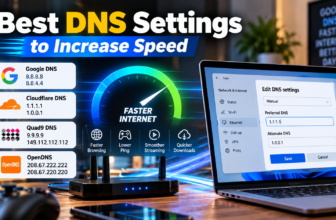
| DNS Provider | Primary DNS | Secondary DNS |
|---|---|---|
| Google Public DNS | 8.8.8.8 | 8.8.4.4 |
| Cloudflare DNS | 1.1.1.1 | 1.0.0.1 |
| Quad9 | 9.9.9.9 | 149.112.112.112 |
Changing DNS does not magically make slow internet fast, but it can sometimes improve website lookup speed, reliability, or filtering depending on the DNS provider.
Can DNS Affect Internet Speed?
Yes, but only in a specific way.
DNS mainly affects the time it takes to find a website address before the site starts loading.
It does not usually increase your actual download speed.
Think of it like calling a restaurant to ask for directions. A faster DNS server gives you the address faster. But once you start driving, your car speed depends on traffic, road conditions, and your vehicle.
In internet terms:
- DNS affects lookup time.
- Your internet plan affects bandwidth.
- Wi-Fi quality affects stability.
- Website server speed affects loading.
- Device performance affects browsing.
So if your internet feels slow, DNS might be one small part of the problem, but it is not always the main cause.
What Happens When DNS Fails?
When DNS has a problem, your device may not know where to find the website.
You may see errors like:
- DNS server not responding
- Server IP address could not be found
- This site can’t be reached
- Name resolution failed
- Website not loading
- Email not delivering
The website itself may be working fine. Your device just cannot find the correct address.
Quick Fix Box
Quick Fix Box
If a website will not load but your internet is connected, try restarting your router, switching DNS servers, clearing your browser cache, or flushing DNS on your device. DNS problems often look like internet problems even when your connection is actually working.
Is DNS Secure?
Traditional DNS was not originally designed with strong privacy and security in mind.
Google explains that traditional DNS queries and replies are usually sent without encryption over UDP or TCP, which can expose them to surveillance, spoofing, or filtering.
In simple words, normal DNS can sometimes be seen or manipulated by networks between you and the DNS server.
This is why newer technologies exist, such as:
- DNS over HTTPS
- DNS over TLS
- DNSSEC
What is DNSSEC?
DNSSEC stands for Domain Name System Security Extensions.
It helps verify that DNS answers have not been tampered with.
According to ICANN, DNSSEC helps protect users by allowing DNS responses to be validated, reducing the risk of being sent to a fraudulent destination through manipulated DNS answers.
Think of DNSSEC like checking the official stamp on a document before trusting it.
It does not encrypt everything you do online, but it helps confirm that the DNS answer is legitimate.
Should You Change Your DNS?
You may want to change your DNS if:
- Websites take too long to start loading
- Your ISP DNS is unreliable
- You want extra filtering against malicious domains
- You want parental control features
- You want privacy-focused DNS options
- You are troubleshooting connection problems
But you do not always need to change it.
If your internet works well, your websites load normally, and you do not need special filtering, your default DNS may be fine.
When changing DNS can help
Changing DNS can help when your current DNS provider is slow, unstable, or blocking certain lookups incorrectly.
For example, if your internet connection is active but websites keep showing DNS errors, testing another DNS provider can be useful.
When changing DNS will not help
Changing DNS will not fix:
- Weak Wi-Fi signal
- Low internet package speed
- Broken router
- Faulty network cable
- Website server outage
- Malware infection
- Full device storage
- Bad browser extensions
DNS is important, but it is not magic. Sadly, no “8.8.8.8” spell fixes everything.
How to Check If You Have a DNS Problem
Here are simple signs that DNS may be involved:
- Some websites fail while others work.
- Your internet shows connected, but websites do not open.
- Apps work, but browsers fail.
- One device works, another device does not.
- A new website or email setup is not working after DNS changes.
- Restarting the router temporarily fixes the problem.
For home users, the easiest first step is to restart your router and device.
For business users, check recent DNS changes, domain expiry, name server settings, MX records, and DNS propagation.
Common DNS Mistakes
Changing DNS without writing down the old settings
Before changing anything, take a screenshot of your current DNS settings.
This makes rollback easier if something breaks.
Confusing DNS with internet speed
DNS can affect how quickly websites start loading, but it does not directly upgrade your internet speed.
If your Wi-Fi is weak, changing DNS will not fix the signal.
Editing domain records randomly
For website owners, changing DNS records without understanding them can break websites, email, or verification systems.
Be extra careful with:
- MX records
- Name servers
- CNAME records
- SPF, DKIM, and DMARC TXT records
Not waiting for DNS propagation
After changing DNS, some users expect everything to update immediately.
Sometimes it does. Sometimes it does not.
Give it time before assuming the change failed.
FAQ
What is DNS in simple words?
DNS is the system that changes website names into IP addresses. It lets you type easy names like google.com instead of remembering long numbers.
What is DNS used for?
DNS is used to help devices find websites, email servers, apps, business systems, and online services. It works quietly whenever you visit most websites.
Can DNS make my internet faster?
DNS can make website lookup faster, but it does not increase your actual internet plan speed. If your Wi-Fi is weak or your line is slow, DNS alone will not solve everything.
Is it safe to change DNS?
Yes, changing DNS is usually safe if you use a trusted provider and record your old settings first. However, changing business domain DNS records without care can break websites or email.
What DNS should I use?
Many users stay with their internet provider’s DNS. Others use public DNS services like Google Public DNS, Cloudflare DNS, or Quad9. The best choice depends on speed, privacy, reliability, and filtering needs.
Why do I get DNS errors?
DNS errors can happen because of router issues, wrong DNS settings, expired domain names, failed DNS servers, blocked lookups, or old cached DNS information on your device.
Final Thoughts
Now that you know what is DNS, the internet should feel a little less mysterious.
DNS is not something most people think about every day, but it is one of the main systems that makes the web easy to use. It turns website names into addresses computers understand, helps emails reach the right servers, and supports many apps and business services.
For normal users, DNS matters most when websites stop loading or internet browsing feels strange.
For website owners and businesses, DNS is even more important because wrong settings can break websites, email, domain verification, and cloud services.
The simple rule is this:
DNS is like the internet’s address book. When it works, everything feels normal. When it breaks, the internet suddenly feels broken—even when your connection is still alive.






[…] DNS stands for Domain Name System. […]