Difficulty: Beginner
Why a Budget Gaming Mouse Is Better Than a Cheap Office Mouse
Many people assume gaming mice are only for gamers. That is no longer true.
A modern budget gaming mouse often provides:
- Better tracking accuracy
- Faster response times
- More comfortable grip shapes
- Longer durability
- Customizable buttons
- Better scrolling performance
Think of it like upgrading from a basic motorcycle to a smoother, more stable touring bike. Both can get you somewhere, but one simply feels better every day.
For office work, these improvements help with:
- Spreadsheet navigation
- Video editing
- Graphic design
- Multitasking
- Long working hours
- Reduced wrist fatigue
According to Logitech and industry gaming hardware trends, sensor quality and ergonomics have improved massively even in lower-priced models.
Quick Takeaway Box
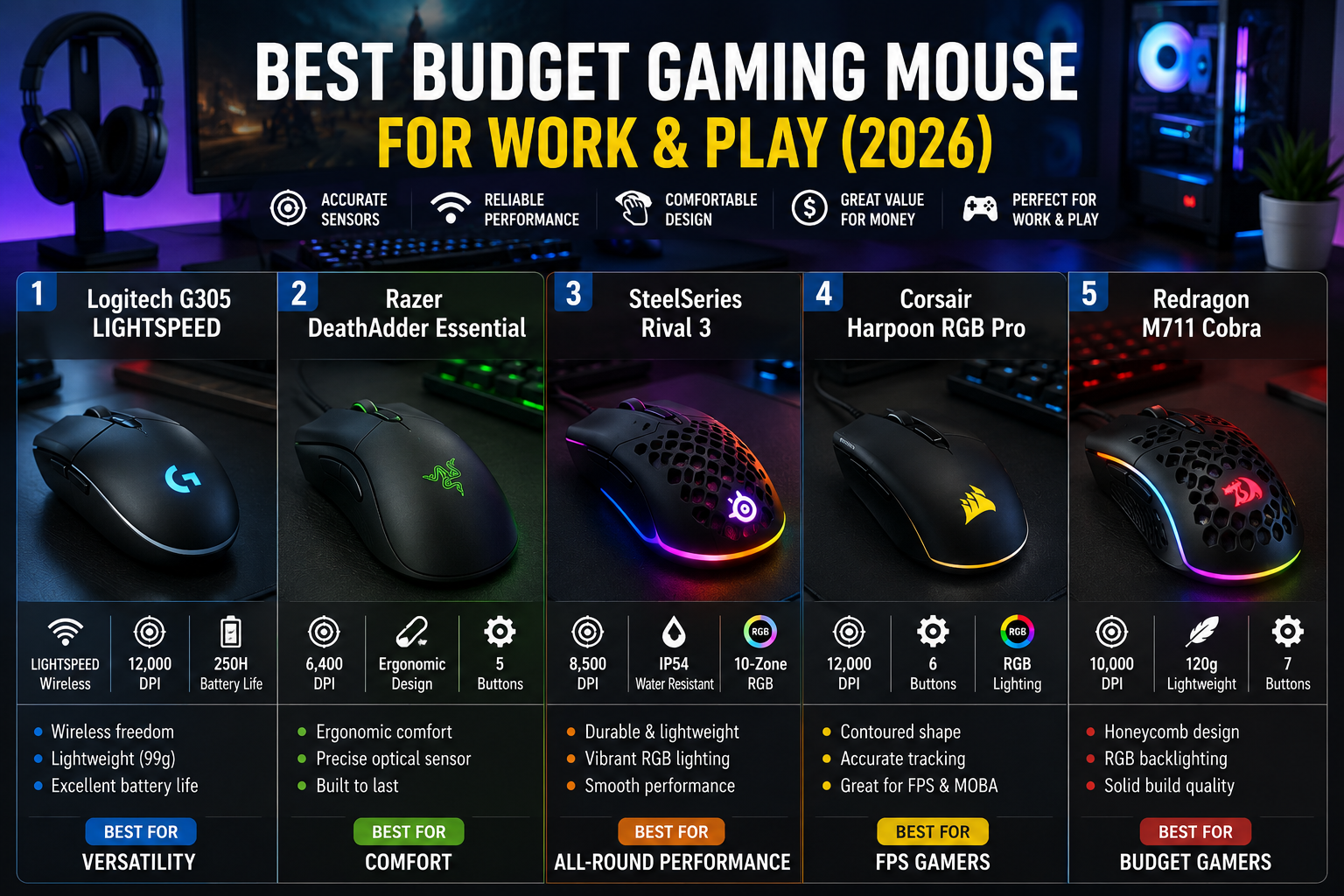
Best Overall Budget Gaming Mouse (2026)
- Best Wireless: Logitech G305 LIGHTSPEED
- Best Comfort: Razer DeathAdder Essential
- Best Lightweight Feel: SteelSeries Rival 3
- Best RGB Value: Corsair Harpoon RGB Pro
- Best Ultra-Budget Pick: Redragon M711 Cobra
What to Look for in a Budget Gaming Mouse
Before buying, focus on these important features.
Sensor Quality
The sensor tracks your movement.
A bad sensor can feel jumpy or inaccurate. A good one feels smooth and natural.
For work and gaming, aim for:
- Accurate tracking
- Stable cursor movement
- No random skipping
Weight and Comfort
Some people prefer lightweight mice for fast movement.
Others prefer heavier mice for stability.
If you work 8+ hours daily, comfort matters more than flashy RGB lights.
Wired vs Wireless
Wireless mice used to be slower.
That is no longer true.
Modern wireless gaming mice like the Logitech G305 now perform nearly as fast as wired models.
Think of it like modern Wi-Fi replacing old Ethernet limitations for many users.
Programmable Buttons
Extra buttons help with:
- Copy/paste shortcuts
- Browser navigation
- Push-to-talk
- Gaming macros
- Productivity apps
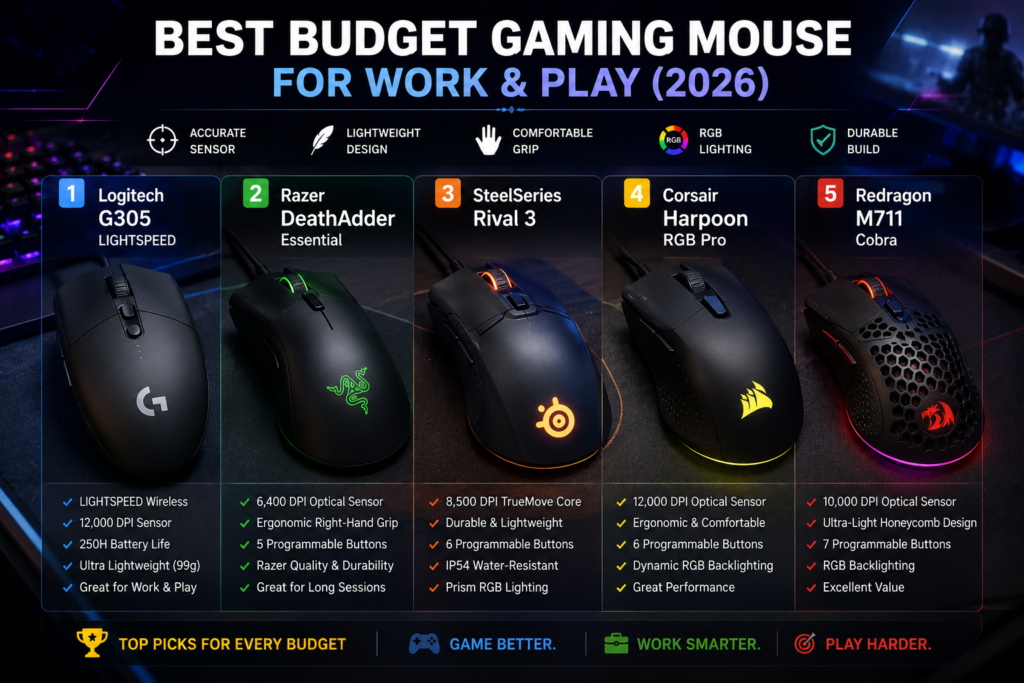
Best Budget Gaming Mouse Picks for 2026
1. Logitech G305 LIGHTSPEED — Best Overall Wireless Budget Gaming Mouse
Logitech G305 LIGHTSPEED
The Logitech G305 remains one of the strongest value picks in 2026.
Why people love it:
- Excellent wireless performance
- Very reliable HERO sensor
- Long battery life
- Lightweight feel
- Clean professional design
This mouse works especially well if you want something suitable for:
- Office meetings
- Casual gaming
- Remote work
- Travel setups
Unlike flashy gaming mice, the G305 looks professional enough for work environments.
Many users also pair this with setups focused on productivity and AI workflows like What Is Edge AI systems where fast navigation matters.
Pros
- Extremely reliable wireless connection
- Excellent battery life
- Lightweight
- Great sensor accuracy
Cons
- Uses AA battery
- Smaller shape may not fit large hands
2. Razer DeathAdder Essential — Best Comfort for Long Hours
Razer DeathAdder Essential
The DeathAdder series is famous for comfort.
If your hand hurts after long computer sessions, this mouse is worth considering.
The ergonomic shape supports your palm naturally, making it excellent for:
- Office productivity
- MMO gaming
- Long editing sessions
- Students and professionals
Why It Stands Out
Even though it is affordable, it feels surprisingly premium.
The shape is its biggest advantage.
Think of it like a comfortable office chair — you notice the difference after several hours.
Pros
- Excellent ergonomics
- Reliable sensor
- Comfortable for large hands
- Durable build
Cons
- Wired only
- Slightly heavier than newer lightweight mice
3. SteelSeries Rival 3 — Best Lightweight Feel
SteelSeries Rival 3
The Rival 3 focuses on speed and lightweight movement.
This makes it excellent for:
- FPS gaming
- Fast cursor movement
- Multi-monitor workflows
- Fast-paced office navigation
One underrated feature is its excellent click response.
The buttons feel crisp and responsive without being overly loud.
For smoother screen movement during gaming or office multitasking, understanding Monitor Refresh Rates Explained can also help improve your overall experience.
Pros
- Lightweight design
- Excellent click feel
- High-quality sensor
- Strong value
Cons
- RGB lighting is basic
- Cable is average quality
4. Corsair Harpoon RGB Pro — Best RGB Value
Corsair Harpoon RGB Pro
If you want gaming aesthetics without spending too much, the Harpoon RGB Pro is a strong option.
It balances:
- Comfort
- RGB lighting
- Gaming performance
- Productivity use
Unlike some budget gaming mice that look overly aggressive, this model stays relatively clean and usable in professional setups.
Best For
- RGB lovers
- Hybrid gaming/work setups
- Medium-sized hands
- Budget streamers
Pros
- Comfortable shape
- Nice RGB lighting
- Good sensor quality
- Lightweight
Cons
- Software can feel heavy
- Side grips may wear over time
5. Redragon M711 Cobra — Best Ultra-Budget Gaming Mouse
Redragon M711 Cobra
The Redragon M711 Cobra proves you do not need expensive gear for a decent gaming experience.
It is ideal for:
- Students
- Entry-level gamers
- Budget PC builds
- Backup mouse setups
Despite the low price, you still get:
- RGB lighting
- Adjustable DPI
- Programmable buttons
Pros
- Very affordable
- Surprisingly feature-rich
- Good customization
- Strong beginner option
Cons
- Software is basic
- Build quality not as refined as premium brands
Wired vs Wireless: Which Is Better in 2026?
For most people, both are now excellent.
Choose Wired If:
- You want lowest possible cost
- You dislike charging batteries
- You mainly stay at one desk
Choose Wireless If:
- You travel often
- You hate cable drag
- You want a cleaner desk setup
Modern wireless latency is now extremely low.
According to industry testing from major gaming hardware reviewers, many users cannot even feel the difference anymore between high-quality wireless and wired gaming mice.
Are Budget Gaming Mice Good for Office Work?
Absolutely.
In fact, many professionals now prefer gaming mice because they:
- Last longer
- Feel more comfortable
- Respond faster
- Offer better customization
A good budget gaming mouse can improve:
- Productivity
- Comfort
- Workflow efficiency
This is especially useful for IT workers, designers, editors, and remote workers.
Common Mistakes When Buying a Budget Gaming Mouse
Buying Only Based on RGB
RGB lights look nice, but comfort matters more.
Ignoring Hand Size
A small mouse may feel uncomfortable for large hands.
Choosing Extremely Cheap Unknown Brands
Some ultra-cheap mice have:
- Poor sensors
- Weak switches
- Bad software
Stick with reliable brands when possible.
FAQ
Is a budget gaming mouse worth it?
Yes. Many affordable gaming mice now offer excellent sensors, comfort, and durability for both work and gaming.
Which budget gaming mouse is best for office work?
The Logitech G305 and Razer DeathAdder Essential are excellent for productivity and long working hours.
Are wireless gaming mice reliable now?
Yes. Modern wireless gaming mice are very fast and stable, especially models from Logitech and Razer.
How much should I spend on a budget gaming mouse?
Most good budget gaming mice cost between RM80 to RM200 depending on features and wireless support.
Can gaming mice reduce wrist fatigue?
A comfortable ergonomic gaming mouse can help reduce strain during long computer sessions.
Is RGB important?
Not really. RGB is mostly cosmetic. Comfort and sensor quality matter more.